Summary
A customer reported broken invoice output where special characters appeared corrupted. While it initially looked like a formatting issue, the root cause turned out to be a character encoding mismatch at the environment level.
The Problem
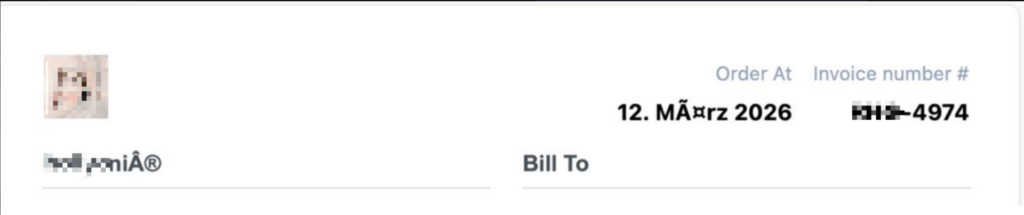
The customer noticed that invoice output was not rendering correctly.
Examples included:
- “März” displaying as “März”
- Special symbols appearing corrupted
At first glance, this pointed toward a formatting or localization issue.
Initial Investigation
The first step was to verify whether the issue could be reproduced.
- Tested the same inputs in a controlled environment
- Output appeared correct
- No immediate indication of a plugin-level issue

This suggested the problem was environment-specific.
Misleading Signals
One complicating factor was the date and localization differences.
The output format on the customer’s site differed from the expected formatting, which initially suggested:
- A translation mismatch
- Or formatting inconsistency
We explored:
- Plugin-level string translations
- Output formatting adjustments
These changes aligned the format, but did not resolve the corruption issue.
Key Insight
The corrupted pattern (“März”) is a classic indicator of a character encoding mismatch.
This typically happens when:
- Data is stored in UTF-8
- But interpreted using a different encoding (e.g., Latin1)
At this point, it became clear the issue was not in formatting, but in data interpretation.
Solution
The focus shifted to the environment configuration.
The fix involved aligning encoding across all layers:
- Database charset →
utf8mb4 - Database collation →
utf8mb4_unicode_ci - PHP/internal encoding → UTF-8
- Ensuring consistent handling when saving and retrieving data
After updating these settings and re-saving the affected values, the issue was resolved immediately.
Result
- Special characters rendered correctly
- Invoice output matched expected formatting
- No changes were required in the plugin itself
Client Feedback
I recently ran into an annoying issue where special characters were breaking on my invoices. I contacted the support and Amimul took my case. Even though the issue couldn’t be replicated on their end, Amimul was incredibly patient and persistent. Instead of giving up, he pinpointed that my server environment had a character encoding mismatch. He pointed me in the exact right direction (updating the charset in my wp-config.php), which after updating the database table charset in phpMyAdmin aswell fixed the issue immediately. It is rare to find support that actually investigates deep configuration issues rather than just blaming other plugins. The plugin works wonderfully and the exceptional support is the icing on the cake. Highly recommended!
You can find the details of the review here: https://wordpress.org/support/topic/brilliant-plugin-backed-by-phenomenal-support/
Technical Insight
Character encoding issues are often subtle because they don’t originate where they appear.
In WordPress environments:
- Data flows through multiple layers (database → PHP → output)
- Any mismatch between these layers can corrupt text rendering
The pattern “März” is a strong diagnostic signal of UTF-8 misinterpretation.
Key Takeaways
- Not all issues originate from the plugin layer
- Environment configuration can significantly impact output
- Pattern recognition helps narrow down root causes quickly
- Correct diagnosis is more valuable than quick assumptions
Final Thoughts
This case highlights an important principle in debugging:
The visible issue is not always the real issue.
Taking a step back and identifying the correct layer is often what leads to a clean and reliable solution.